How do you know a dealership lead form works?
Run an authorized test. Check the on-page result, destination receipt, and shopper response separately.
Your next check.
0 / 6Use this while you test. Checks stay on this page until you reload.
A vendor ticket you can actually use
Lead form check
Page and form: [URL, name]
Tested: [date, device]
Request: [question; omit personal details]
On-page result: [result]
CRM/inbox receipt: [confirmed or unverified]
Automatic reply: [result, time]
Human answer: [result, time]
Evidence: [redacted captures]
Retest: [same form and outcome]
Test each form separately.
General contact, vehicle pricing, trade valuation, and service may use different tools. One accepted submission does not establish that all of them work.
Use a controlled address, a specific request, and an agreed test window. Record the starting URL, form name, and exact on-page result.
Follow the handoff.
A thank-you page proves an acknowledgment. Check your CRM or inbox to establish receipt, then inspect the automatic and human responses the shopper receives.
Keep timestamps for each stage. A quick automatic reply can still leave the actual question unanswered.
Retest the original failure.
Give the responsible vendor the same form, input path, and dated capture. After a change, repeat the submission and verify both receipt and response.
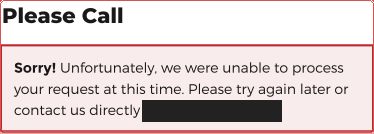
An explicit processing error establishes that attempt’s outcome. A CAPTCHA or network restriction may instead leave the test inconclusive.
AI chat and lead capture
A vendor’s chatbot answers in your store’s name. Ask where a chat lead lands, and what the shopper sees when nobody is on.
If you build the chat or the form, check the CRM for the lead, not the “sent” on the screen.
Open the chat on a phone, ask about a car, and find that lead in the CRM. Ask it for the parts department’s phone number and compare it to your contact page.
Run your numbers.
Use the sales calculator to explore a scenario using your own inputs.
Open the calculator ↗